Model
A connector is an object with two ends. Each end stores the identifier of an object, not a point on the canvas. Everything else follows from this:
- the line is rebuilt when the object is moved;
- deleting an object deletes the connector;
- "drag an end onto another object" is a change of identifier, not drawing the line again.
Anchors
Anchors are points on the edge of an object from which a line can come out. They are visible on a selected object: while the object is not selected, the same mouse movement moves it instead of creating a connector.
The side of the anchor is chosen by the relative position of the objects. If you move an object around another one, the line moves to the nearest side.
Routing
| Routing | When it fits |
|---|---|
| straight | a short connector between objects standing next to each other |
| angular | a diagram where horizontals and verticals matter |
| curved | an organic diagram where sharp corners get in the way |
Routing is a property of the connector, not a global setting: different routings can coexist in one diagram.
Waypoints
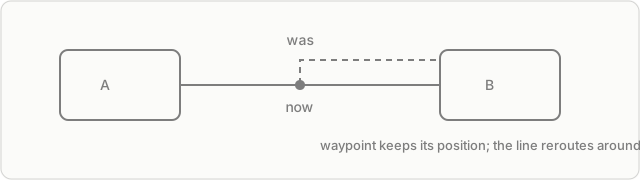
A point is added by dragging a segment of the line and stays attached to the connector. Such a point is fixed: when the ends move, it keeps its position, so the line goes around an obstacle. A double click on a point deletes it and joins the segments.
The limit is 32 points per connector.
Model limits
- One pair of objects — one connector. A second line between the same objects cannot be created.
- A connector from an object to itself is not allowed.
- A kanban card, a frame and a kanban cannot be an end: they have no edge to attach to.
Where to go next
Connectors — what this gives in practice and where the limit is.